

Table of Contents
How to Get More Twitter Impressions
Learning how to get more Twitter impressions on X starts with focusing on what actually moves the needle: the substance of your posts. Our analysis of platform data shows that content quality and length drive reach far more than the specific hour or day you post. For example, posts exceeding 1,000 characters receive 88% more views than short posts, and Articles generate 166% more views and 190% more bookmarks. Weekend posts often perform slightly better than mid-week posts, contrary to traditional wisdom, and taking a break from the platform for up to two weeks does not negatively impact reach. By prioritizing high-effort content over rigid scheduling strategies, creators can naturally expand their visibility without chasing trends or timing tricks. This approach sets the stage for the practical steps we’ll cover next.
Key Takeaways
- Before you write your first post, we recommend going through X post types to find the one that’s best for your message.
- Once your X account is ready, the single biggest lever for more impressions is the substance of each post.
- Even the most engaging content gets buried in the clutter if it’s not made easy to read quickly.
- According to a statistical analysis of 398,882 posts, external links in a main post decrease its reach by 13-15%.
- The first hour after posting is the highest-leverage time for early engagement.
Before You Begin
Before you write your first post, we recommend going through X post types to find the one that’s best for your message. Standard posts allow up to 280 characters and appear on your profile and your followers’ timelines, while Premium long-form posts have 25,000 characters and include some platform-specific limitations, like no scheduling or draft options. Each post type serves a different purpose, so choose the one that works best for your goal before you start writing.
Afterwards, check your account settings to learn how visibility works across timelines and notifications. Any posts starting with @username will only be visible to people who follow you and the @mentioned account, and protected accounts can only interact with approved followers. So if you want a certain audience to see your content, make sure your settings match your reach goals. X’s algorithm may show you content from accounts outside your following, so don’t forget about your formatting and visibility settings before you post.
Now that you've figured out the formats, visibility rules, and account settings, you're ready for your substance-filled post.
Step 1: Write Substance-Rich Posts
Once your X account is ready, the single biggest lever for more impressions is the substance of each post. Data from a large-scale analysis of 398,882 posts shows that long-form content consistently outperforms short text-only posts, with posts exceeding 1,000 characters earning 88% more views. Articles drive the highest gains at 166% more views, while threads deliver a 33% boost.
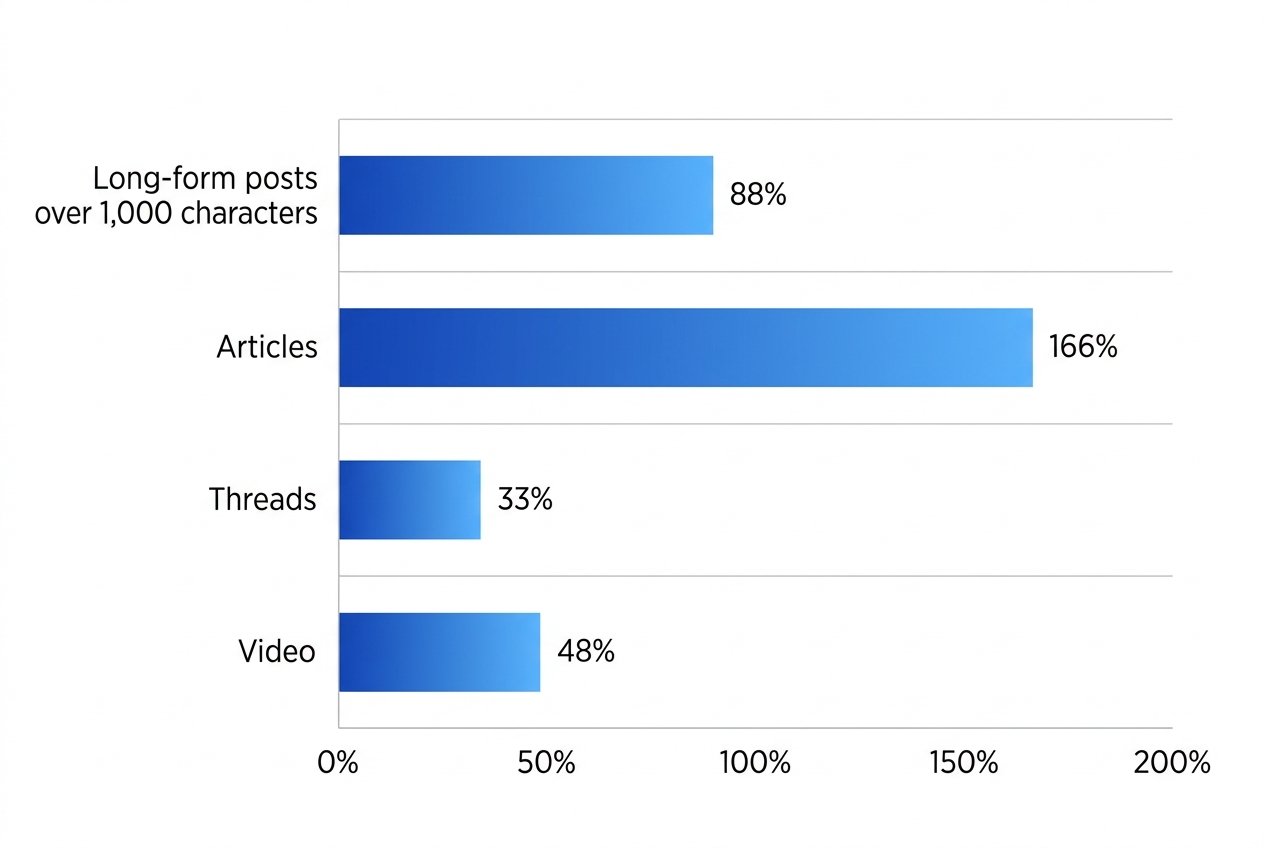
Since standard posts are limited to 280 characters, we either need to have Premium to write longer forms, or use the article and thread format. Focus on fleshing out your idea, sharing practical lessons or building a thread versus hitting any particular character limit.
Step 2: Format Tweets for Scannability
Even the most engaging content gets buried in the clutter if it’s not made easy to read quickly. On X, posts that pause the scroll have one thing in common: they’re scannable.
We recommend three formatting techniques to maximize visibility:
- Hook first: Place your key message in the opening sentence. X timelines truncate long posts, so the first line determines whether someone taps to expand.
- One idea per post: Keep the message focused. A single thought with clear line breaks between ideas prevents cognitive overload and encourages engagement.
- Minimize clutter: Avoid hashtag or mention overload. Every extra symbol interrupts the natural flow of reading, reducing the chance your post gets read in full.
You can attach up to four media items, photos, GIFs or videos, to your post to create a visual break within your feed. With this mix of briefness and visuals, you will have the optimal situation for increased impressions and engagement.
Step 3: Move External Links into Replies
According to a statistical analysis of 398,882 posts, external links in a main post decrease its reach by 13-15%. By placing links in a reply instead of the main post, this penalty can be reduced by 24%, making it a better approach for keeping your content visible.
In order to move a link to a reply, first publish the main post without including the link. Then, reply to your own post with the link included and tap on the reply’s share/more options to select ‘Copy link to post’. This will make the reply easy for readers to find.
Replies will show up in notifications and on your profile but not the mentioned user's profile, so readers know where to look. Don’t start your reply with an @mention, because posts that begin with a username only reach the followers of both accounts.
Step 4: Maximize First-Hour Response Velocity
The first hour after posting is the highest-leverage time for early engagement. Any real comments should get a prompt response, and asking a relevant follow-up question can extend reading time and signal to the algorithm that your content resonates. Do not add any hashtags or links in this hour because they dilute the post and can indicate low-quality content to the ranking system.
Replies are quick and the conversation is extended, which amplifies reach by reinforcing the post to the algorithm, consistent with the fact that the content itself, not timing, is what drives impressions. The sprint mindset makes this first hour more valuable for boosting visibility. Focus your replies on getting people to read the whole post, keeping the conversation going as naturally as you can.
Favor quality over velocity: Reply to each substantive comment, ask a follow-up that causes readers to hang around and keep reading, and don’t add hashtags or links within the first hour.
Step 5: Reply to Larger Accounts in Active Conversations
Replies to large accounts in open threads have more reach, as they put your response in front of a bigger audience. The reply recommendation system in X prioritizes replies in threads from high-followership accounts as these conversations receive more attention, making it more likely that your response will show up in people's notifications and on your profile.
X builds the pool of replies seen in a conversation from three places: Haplo Lite (a cache of up to 3,200 most recent replies), the Earlybird search index (which selects 800 beyond that), and Ancestor Store (which rebuilds reply trees). Each reply gets scored not just based on positive engagement like likes, replies and reposts, but also negative actions like mutes and reports. Health sectioning automatically downranks descendant threads that have been flagged as potentially abusive or violative, so keeping replies on-topic and respectful protects visibility. You can check the ordering yourself by switching the sorting filter of a conversation to “Latest” or “Likes” to avoid personalized ranking.
Step 6: Review Analytics to Find Your Formats
Once you've responded to the bigger accounts in those active threads, the next step is checking out what your own account's format is getting for you. If you want to find out how to get more Twitter impressions on your own account, the fastest way is to analyze your analytics.
First step is to export or note down your top performing posts. Then divide them into formats - long form post, article, thread, video or link - then compare each group to your account’s average. You’ll likely notice that posts with 1,000+ characters receive 88% more views and articles receive 166% more, while external links in main posts reduce reach by 13-15%. Put links in replies to reduce this penalty.
The ranking algorithm does change its weighting at times, most recently on November 5, 2026 with more emphasis on likes and reading time, so make sure you track your stats often. Make it a habit to note what formats and topics garner most attention, and write even more like them for future posts.
Step 7: Double Down on Winning Topics
Once your analytics reveal which topics and formats resonate most with your audience, the highest-leverage move is to publish more of them consistently. If your goal is how to get more Twitter impressions, doubling down on proven topics is the clearest path to sustained growth.
It's about content substance, not when you post it. Content that's over 1,000 characters earns 88% more views, articles 166% more, threads 33% more and videos 48%. External links reduce reach by 13–15%, so keep winning topics link-light or place links in replies to mitigate the penalty. Re-run your analytics every few weeks and keep giving the format that works well more content.
Troubleshooting Low Impressions
If you're searching how to get more Twitter impressions, you'll inevitably hit a point where your best topics cease reaching new people. Don't blame the timing or luck just yet - check out these most common issues first. The recent algorithm changes favor tweets that garner likes, retain viewer attention, so a quick review of your post format might just be the answer.
- Algorithm change: X’s ranking weights were updated on November 5, 2026, giving more weight to likes and reading time. Since X has not issued an official explanation, treat this as the baseline for any unexplained drop in reach.
- Link placement: Posts with external links receive 13–15% fewer views than text-only posts. Move links into replies to reduce the penalty and keep the main post focused on engagement.
- Post length: Short text-only posts underperform. Posts over 1,000 characters earn 88% more views, articles 166%, and threads 33%. If impressions stall, switch formats before adjusting the schedule.
- Hashtag strategy: Hashtags help accounts under 2,500 followers but reduce reach for accounts over 14,000. Test whether removing or refining hashtags improves distribution.
- Video leverage: Video posts receive 48% more views than text-only posts. Adding a short clip can jump-start stalled impressions without a full content overhaul.
Run through this list in order. If the problem remains, consistency in your choices of formatting is more important than any single experiment.
Frequently Asked Questions
How does response velocity in the first hour after posting affect Twitter impressions?
The first hour after posting is the highest-leverage time for early engagement. Prompt replies to substantive comments and asking relevant follow-up questions extend reading time, signaling to the algorithm that the content resonates and amplifying reach.
What are the most effective ways to format tweets to increase organic reach and impressions?
Effective formatting includes placing the key message in the opening sentence, keeping one idea per post, and minimizing clutter. Posts should be scannable with clear line breaks and up to four media items to create visual breaks and improve readability.
Should I include external links in the main tweet or in a reply to maximize impressions?
External links in a main post decrease reach by 13-15%. Placing links in a reply instead reduces this penalty by 24%, making replies the better option for keeping content visible.
How can I use Twitter analytics to identify which content formats and topics consistently drive higher impressions?
Review analytics by exporting or noting top-performing posts, grouping them by format (long-form, article, thread, video, link), and comparing each group to the account’s average. Posts over 1,000 characters receive 88% more views, articles 166%, and threads 33%.
Does participating in active conversations and replying to larger accounts help improve my own tweet impressions?
Replies to larger accounts in open threads have more reach, as they put responses in front of bigger audiences. The reply recommendation system prioritizes replies in high-followership threads, increasing visibility in notifications and profiles.
Build Your Impression-Growth Routine
Creating a routine for growing impressions on X boils down to doing what the data says actually works. We suggest a weekly cycle: write one long form post over 1,000 characters which a statistical analysis of 398,882 posts showed earns 88% more views than short text-only posts. Add one article or thread as well, two formats which deliver 166% and 33% more views respectively. Also include one video a week because they lead to 48% more views. Keep external links out of your main post, putting them in replies can avoid the 13-15% reach penalty. Stop stressing about when you post; the same analysis states that the posting time only accounts for around 5% difference in reach. This routine doesn't promise quick fixes, it's about putting out consistent and meaningful content that builds impressions over time.
Results are illustrative and not a guarantee of future performance.
Put Your Reach Strategy to Work
You now have a complete, evidence-backed routine for growing your impressions on X, from writing substance-rich posts over 1,000 characters to keeping external links out of the main post and maximizing first-hour response velocity. The data is clear that format and content depth matter far more than posting time, so your energy is best spent on what you write, not when you publish it. Applying these steps consistently each week is what turns individual tactics into compounding reach. If you would rather have a team handle the strategy, posting cadence, and analytics review for you, professional social media management can help. On The Mark Digital has been helping businesses grow their digital visibility since 1997. Reach out for a free consultation and start turning these proven tactics into a working routine.
Put Your Reach Strategy to Work